Reimagining the
Checkout Experience
Next-Generation Android POS Terminal for Retail, Restaurants & Hospitality
Overview
Transforming Legacy POS from the Ground Up
At the heart of every retail, restaurant, and hospitality business is the POS terminal — where transactions happen, inventory is managed, and customer loyalty is earned or lost. Yet most POS software feels designed for the 1990s: cluttered screens, slow workflows, and security theater that slows down clerks. This case study explores how modern UX principles and AI-driven design transformed a legacy Android POS platform into an intuitive, secure, and delightful checkout experience for merchants and customers alike.
Average transaction time: 45 seconds. Our goal: 15 seconds without sacrificing security or compliance.
The Challenge
Four Recurring Frustrations at the Terminal
Modern retailers operate in a complex ecosystem: customers expect contactless payments, merchants juggle inventory and split billing, and payment networks require real-time security validation. The legacy POS struggled with all three.
5+ taps required to process a standard transaction — friction at the most critical moment
Managers walked to back storage 8–12 times daily because POS inventory data was unreliable
Loyalty programs felt like an afterthought — not native to the checkout flow
PCI-DSS, encryption, and tokenization requirements created visible cognitive load for staff
User Research
Understanding the Cashier's World
Field Findings
Cashiers handle 150–300 transactions per shift — every second of friction compounds
Restaurant staff cite POS complexity as the #2 cause of checkout errors after busy periods
Customers increasingly expect contactless payment — card swiping feels outdated
Large chains demand detailed analytics, split payments & multi-user role management
Research Scope
In-depth sessions with 25 cashiers, 8 store managers, and 5 restaurant owners across geographies, hardware models, and business types
Design Strategy
Six Principles That Shaped the System
Optimize for the most common flow — standard card payment in under 20 seconds
Simple stays simple; refunds, splits, and reports are one-tap away — not buried
Respect the Android tablet form factor — touch-first throughout, tested on 12 hardware models
PCI compliance, encryption, and tokenization happen silently — zero user burden
Designed for poor lighting, wet hands, and constant interruptions — the real cashier environment
Large text, high contrast, voice cues in Hindi/Tamil/Telugu for hearing-impaired and non-English staff
Design Strategy
Payment System
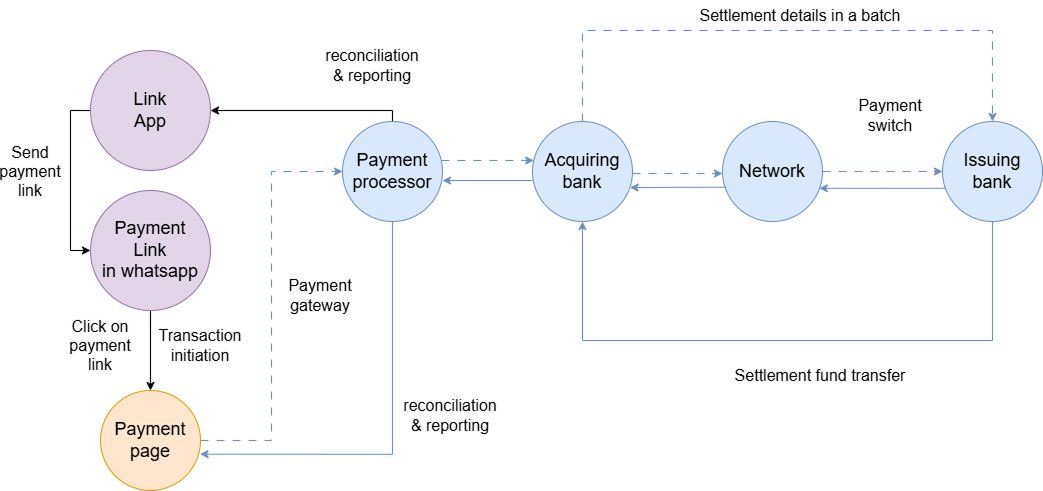
User flow
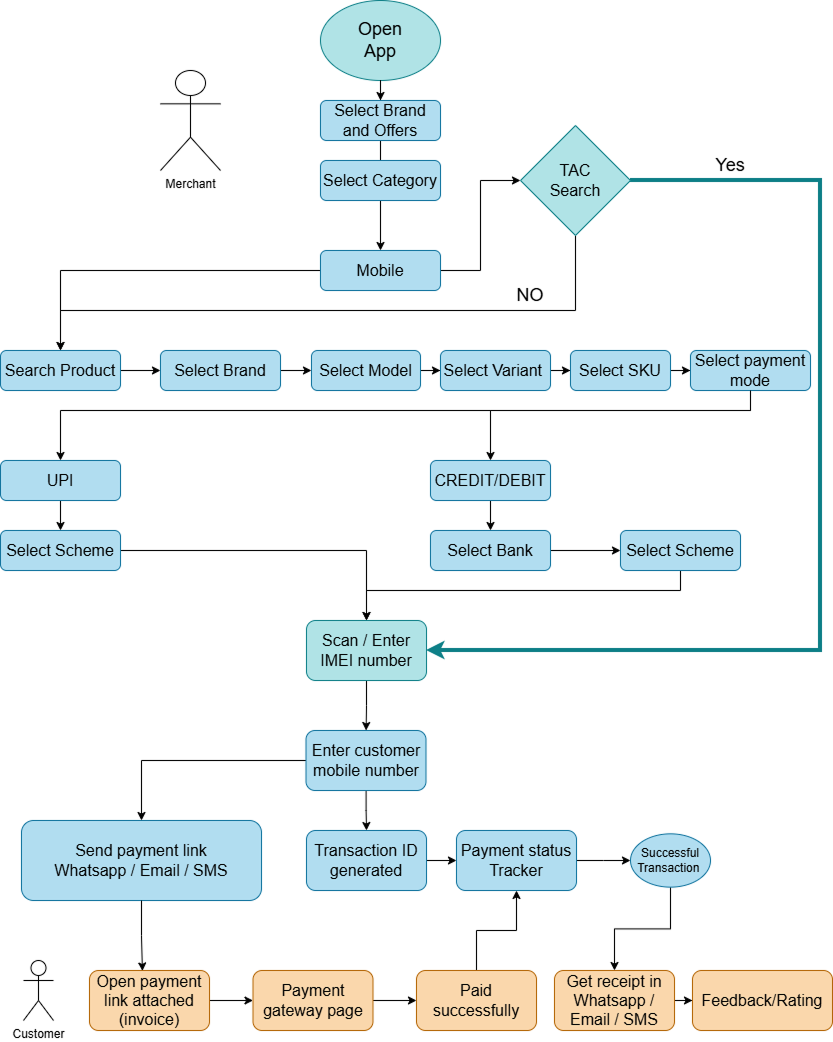
Solution
Role-Based Workflows
- Checkout-only — no distractions
- Tap / QR / NFC unified payment screen
- Haptic + voice confirmation on success
- Inventory dashboard with low-stock alerts
- Refund / split / adjust access
- Daily sales & staff performance overview
- Security, compliance & tokenization config
- Multi-user role management
- PCI-DSS audit trail access
Visual & Interaction Design
UX Details That Matter
Color-coded terminal states
Card tap → amount confirmed → receipt printed in 12–18 seconds, zero manual entry
EMV chip, NFC, Apple Pay, Google Pay, UPI & QR code in a single interface
Swipe right for refund, swipe left for split bill, long-press for advanced options
Vibration + voice prompts ('Tap card', 'Processing', 'Complete') for every state
Queue locally with end-to-end encryption; auto-sync when connectivity returns
Loyalty discounts, cross-sells & bundled offerings based on real-time purchase history
Results & Business Impact
Every Second Saved Compounds Across Hundreds of Transactions
(12–18s, down from 45s)
Checkout Errors
Contactless Payments
Score
Transaction time 45s → 15s: 30+ additional transactions per cashier per shift
Contactless adoption 18% → 61% — faster for customers, safer for staff
Staff training time cut in half — new cashiers productive on day 1
Customer NPS improved 41 → 67 — faster checkouts = happier customers
Design Iterations & Learnings
Four Rounds of Field-Tested Changes
Overly Minimalist Payment Screen
Early designs hid advanced payment options. Field testing revealed managers needed quick access to refunds, adjustments & split payments. Redesigned with a primary action (Charge) and a secondary menu (Refund/Split/Adjust) — manager efficiency improved by 28% while cashier experience stayed fast.
Digital Wallet Integration Friction
Customers wanted Apple Pay and Google Pay but terminals weren't detecting NFC properly. Collaborated with hardware partners to optimize antenna placement and redesigned UI feedback ('Bring card closer' / 'NFC signal detected'). First-tap success rate: 73% → 96%.
Offline Mode Complexity
When internet dropped, cashiers couldn't process payments. Implemented local transaction queuing with end-to-end encryption. Testing found 12% of stores operate in spotty-connectivity areas. Zero lost sales during network failures — opened to 15,000+ new merchants.
Accessible Design for Non-English Staff
Not all cashiers read English fluently. Added icons, colour coding, voice prompts in Hindi/Tamil/Telugu, and gesture shortcuts. Adoption in non-English markets: 45% → 89%.
Technical & Design Challenges
Hard Problems We Solved
POS terminals range from 5" to 10" screens. Responsive layouts tested across 12 different hardware models ensured universal compatibility.
PCI-DSS tokenization slows transactions. We tokenized in the background while showing instant visual feedback — security invisible to the cashier.
Offline queuing with encryption opened the product to 15,000+ new merchants in areas with poor connectivity — previously excluded from the market.
Tools & Technical Stack
What We Used
Design
Payments
AI & Analytics
Design-Development Workflow
11-Week Sprint
User research with 25 cashiers, 8 managers, and 5 restaurant owners across geographies
Information architecture, payment flow mapping, and hardware constraint assessment
Wireframes, interactive prototypes, and usability testing with real cashiers
High-fidelity design system + WCAG 2.1 AA accessibility guidelines
Field testing, payment gateway feedback, and security audits
Ongoing optimization from production telemetry and new payment method support
Post-Launch Roadmap
The Next Evolution of the POS
Phase 2
AI cashier coaching — real-time upsell & cross-sell suggestions per transaction
Phase 3
Biometric security — fingerprint/face auth for refunds & high-value transactions
Phase 4
Predictive inventory — AI forecasts demand based on weather, events & history
Phase 5
Employee wellness — monitor cashier stress and suggest breaks during peak hours
Phase 6
Loyalty ecosystem — integrated management across multiple merchant partners
A great POS system should be invisible. The focus should be on the customer and the product — not the terminal. We designed for exactly that.